System
Click the badge below to try this tutorial interactively in your browser:

You can also run this tutorial inGoogle Colab. It takes a one-time setup per session: follow theColab instructions.
Prepared by:
Learning objectives. After this tutorial, you will be able to:
Compose
SanUnitinstances into aSystemSimulate a system and read its results
View the flowsheet diagram and summary tables
Attach a process specification to steer a system toward a target
Compile one annualized result across operating modes with
AgileSystemDiagnose and control recycle convergence
Prerequisites: 4. SanUnit (basic)
Covered topics:
Creating a simple System
Retrieving useful information
Process specifications
Operational flexibility
Controlling recycle convergence
Companion video. A walkthrough of this tutorial is available on YouTube, presented by Tori Morgan. Recorded against
QSDsanv1.2.0. The concepts still apply, but if the code on screen differs from this notebook, follow the notebook.
Setup
Import QSDsan and confirm the installed version.
[1]:
import qsdsan as qs
print(f'This tutorial was made with qsdsan v{qs.__version__}.')
This tutorial was made with qsdsan v1.5.3.
1. Creating a simple System
System objects are used to organize one or more unit operations in a certain order and facilitate mass and energy convergence, techno-economic analysis (TEA), and life cycle assessment (LCA).
The system mimics the Benchmark Simulation Model No. 1 (BSM1), a standard activated-sludge layout: two anoxic tanks, three aerated tanks, and a clarifier, with two recycles returning to the first tank.
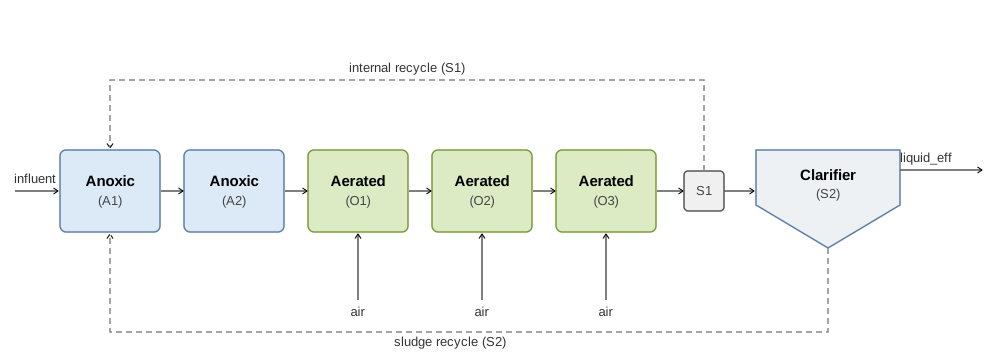
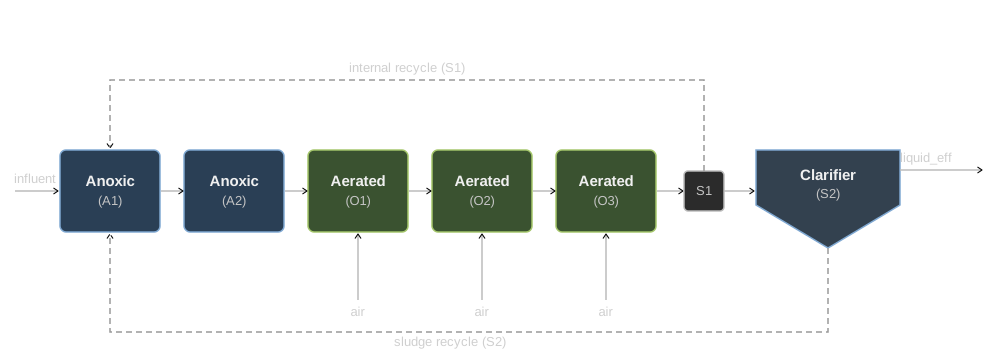
At this stage we won’t include any of the process models (covered later in 10. Process and 11. Dynamic Simulation); we will just use some surrogate units in their place.
So we’ll want to firstly have two anoxic reactors (mix tanks without O2), followed by three aerated reactors (mix tanks with O2), and a clarifier (splitter)
Note that we will also need two recycles, one from the last aerated reactor to the first anoxic reactor, and another one from the clarifier to the anoxic reactor
[2]:
# As always, firstly we need to set the components we want to work with,
# here we will just load the default components
cmps = qs.Components.load_default()
# Set the components and make an influent
qs.set_thermo(cmps)
ww = qs.WasteStream.codbased_inf_model('ww', flow_tot=1000, units=('L/hr', 'mg/L'))
ww.show()
WasteStream: ww
phase: 'l', T: 298.15 K, P: 101325 Pa
flow (g/hr): S_F        75
             S_U_Inf    32.5
             C_B_Subst  40
             X_B_Subst  227
             X_U_Inf    55.8
             X_Ig_ISS   52.3
             S_NH4      25
             S_PO4      8
             S_K        28
             S_Ca       140
             S_Mg       50
             S_CO3      120
             S_N2       18
             S_CAT      3
             S_AN       12
             ...        9.96e+05
 WasteStream-specific properties:
  pH         : 7.0
  Alkalinity : 10.0 mmol/L
  COD        : 430.0 mg/L
  BOD        : 249.4 mg/L
  TC         : 265.0 mg/L
  TOC        : 137.6 mg/L
  TN         : 40.0 mg/L
  TP         : 10.0 mg/L
  TK         : 28.0 mg/L
  TSS        : 209.3 mg/L
 Component concentrations (mg/L):
  S_F          75.0
  S_U_Inf      32.5
  C_B_Subst    40.0
  X_B_Subst    226.7
  X_U_Inf      55.8
  X_Ig_ISS     52.3
  S_NH4        25.0
  S_PO4        8.0
  S_K          28.0
  S_Ca         140.0
  S_Mg         50.0
  S_CO3        120.0
  S_N2         18.0
  S_CAT        3.0
  S_AN         12.0
  ...
[3]:
# Make the first two anoxic reactors
A1 = qs.unit_operations.MixTank('A1', ins=(ww, 'recycle1', 'recycle2'),
                                    tau=1, V_wf=0.8, init_with='WasteStream')
A2 = qs.unit_operations.MixTank('A2', ins=A1-0, tau=1, V_wf=0.8, init_with='WasteStream')
Note that for A1, we saved two spots for recycles by just giving them the IDs of “recycle1” and “recycle2”, we will connect them to the corresponding units after we create them later.
Additionally, when creating A2, we indicated that the ins=A1-0, the expression with hyphen - is called “-pipe-notation”, briefly (U1, U2, and U3 are just units):
U1-0is equivalent toU1.outs[0]0-U1is equivalent toU1.ins[0]U1-0-1-U2is equivalent toU2.ins[1] = U1.outs[0]Note that
U1-0-1-U2is not equivalent toU2-1-0-U1, which meansU1.outs[0] = U2.ins[1](likea = b, which gives the value ofbtoa, is not the same asb = a, which gives the value ofatob)If
U1just has one effluent andU2just have one influent, we can useU1-U2
This is applicable for multiple influents/effluents as well, e.g.,
(U1-0, U3-0)-U2is equivalent toU2.ins[0] = U1.outs[0]andU2.ins[1] = U3.outs[0]
[4]:
# Then have three O2 streams, assuming we are just pumping air
# (the numbers here are illustrative)
oxy1 = qs.WasteStream('oxy1', S_O2=ww.F_mass*0.01)
oxy1.imol['S_N2'] = oxy1.imol['S_O2']/0.21*0.79
oxy2 = oxy1.copy('oxy2')
oxy3 = oxy1.copy('oxy3')
[5]:
# Setting up the three aerated tanks
O1 = qs.unit_operations.MixTank('O1', ins=(A2-0, oxy1), tau=1, V_wf=0.8, init_with='WasteStream')
O2 = qs.unit_operations.MixTank('O2', ins=(O1-0, oxy2), tau=1, V_wf=0.8, init_with='WasteStream')
O3 = qs.unit_operations.MixTank('O3', ins=(O2-0, oxy3), tau=1, V_wf=0.8, init_with='WasteStream')
[6]:
# Now note that we need to set up a splitter after the last aerated tank,
# to create the recycle stream
S1 = qs.unit_operations.Splitter('S1', ins=O3-0, outs=('', 1-A1), # `''` means we use default ID
                          split=0.9, init_with='WasteStream')
[7]:
# Add in the clarifier, which is actually also a splitter
# (if we ignore the part that splitter does not have costs),
# since it's a clarifier, let's assume that 90% of the solubles
# (including dissolved gas and colloidal) will
# go to the liquid stream while 10% go to the sludge,
# and all solids go to the sludge
split_dct = {i.ID: 0.9 if i.particle_size != 'Particulate' else 0 for i in cmps }
Python Aside: dict/list comprehensions (click to expand)
split_dct above is built with a dict comprehension, a compact one-line way to build a dict from a loop. It is equivalent to:
split_dct = {}
for i in cmps:
    if i.particle_size != 'Particulate':
        split_dct[i.ID] = 0.9
    else:
        split_dct[i.ID] = 0
[8]:
S2 = qs.unit_operations.Splitter(
    'S2', ins=S1-0, outs=('liquid_eff', 2-A1),
    split=split_dct, init_with='WasteStream')
[9]:
# It's time to create the system!
# Since one system can only handle one recycle,
# we need to make two systems
internal_sys = qs.System('internal_sys',
                         path=(A1, A2, O1, O2, O3, S1), # all units within this internal sys
                         recycle=S1-1 # the recycle stream
                         )
[10]:
# When creating the second system,
# we can include the first one in the `path`
external_sys = qs.System('external_sys',
                         path=(internal_sys, S2),
                         recycle=S2-1
                         )
[11]:
# Tada~! Let's take a look at the system
external_sys.diagram()

[12]:
# Building the system by hand (above) meant nesting one recycle per `System`.
# `from_units` instead infers the whole network (including both recycle loops) from a
# list of units, so you do not have to nest them yourself:
auto_sys = qs.System.from_units('auto_sys', units=external_sys.units)
auto_sys.diagram()

Recycle convergence. A system with recycle streams is solved iteratively until the recycle streams stop changing. The default solver usually converges on its own. When a system will not, the molar_tolerance, temperature_tolerance, maxiter, and method attributes (or sys.set_tolerance(...)) control the solve. Section 5 collects the full set, shows how to read a non-convergence error, and lists what to adjust.
2. Retrieving useful information
Now that we have the system, we can retrieve information using the many attributes System has.
[13]:
# Firstly, if you want to look at what units are within the system
sys = external_sys # Give it a shorthand
sys.units
[13]:
[<MixTank: A1>,
 <MixTank: A2>,
 <MixTank: O1>,
 <MixTank: O2>,
 <MixTank: O3>,
 <Splitter: S1>,
 <Splitter: S2>]
[14]:
# Which is different from
sys.path
[14]:
(<System: internal_sys>, <Splitter: S2>)
Every unit and stream is registered in the active flowsheet (qs.F, i.e., qs.main_flowsheet), so you can fetch one by its ID instead of keeping a variable around. This is also why reusing an ID triggers a “replaced in registry” warning. Switch or isolate namespaces with qs.main_flowsheet.set_flowsheet('name').
[15]:
# Fetch a unit or stream by ID from the flowsheet
print(qs.F.unit.A1, '|', qs.F.unit.A1 is A1)   # same object as the `A1` variable
qs.F.stream.ww                                  # a stream by ID
A1 | True
WasteStream: ww to <MixTank: A1>
phase: 'l', T: 298.15 K, P: 101325 Pa
flow (g/hr): S_F        75
             S_U_Inf    32.5
             C_B_Subst  40
             X_B_Subst  227
             X_U_Inf    55.8
             X_Ig_ISS   52.3
             S_NH4      25
             S_PO4      8
             S_K        28
             S_Ca       140
             S_Mg       50
             S_CO3      120
             S_N2       18
             S_CAT      3
             S_AN       12
             ...        9.96e+05
 WasteStream-specific properties:
  pH         : 7.0
  Alkalinity : 10.0 mmol/L
  COD        : 430.0 mg/L
  BOD        : 249.4 mg/L
  TC         : 265.0 mg/L
  TOC        : 137.6 mg/L
  TN         : 40.0 mg/L
  TP         : 10.0 mg/L
  TK         : 28.0 mg/L
  TSS        : 209.3 mg/L
 Component concentrations (mg/L):
  S_F          75.0
  S_U_Inf      32.5
  C_B_Subst    40.0
  X_B_Subst    226.7
  X_U_Inf      55.8
  X_Ig_ISS     52.3
  S_NH4        25.0
  S_PO4        8.0
  S_K          28.0
  S_Ca         140.0
  S_Mg         50.0
  S_CO3        120.0
  S_N2         18.0
  S_CAT        3.0
  S_AN         12.0
  ...
[16]:
# Similar to units, you need to first simulate the system
# before you check out attributes that are not set up
# upon initialization (e.g., units, recycles)
sys.simulate()
sys

System: external_sys
Highest convergence error among components in recycle
stream S2-1 after 2 loops:
- flow rate   6.03e-01 kmol/hr (48%)
- temperature 0.00e+00 K (0%)
ins...
[0] ww
    phase: 'l', T: 298.15 K, P: 101325 Pa
    flow (kmol/hr): S_F        0.075
                    S_U_Inf    0.0325
                    C_B_Subst  0.04
                    X_B_Subst  0.227
                    X_U_Inf    0.0558
                    X_Ig_ISS   0.0523
                    S_NH4      0.00139
                    ...        55.3
[1] oxy1
    phase: 'l', T: 298.15 K, P: 101325 Pa
    flow (kmol/hr): S_N2  1.17
                    S_O2  0.312
[2] oxy2
    phase: 'l', T: 298.15 K, P: 101325 Pa
    flow (kmol/hr): S_N2  1.17
                    S_O2  0.312
[3] oxy3
    phase: 'l', T: 298.15 K, P: 101325 Pa
    flow (kmol/hr): S_N2  1.17
                    S_O2  0.312
outs...
[0] liquid_eff
    phase: 'l', T: 298.15 K, P: 101325 Pa
    flow (kmol/hr): S_F        0.0734
                    S_U_Inf    0.0319
                    C_B_Subst  0.0392
                    S_NH4      0.00136
                    S_PO4      4.06e-05
                    S_K        0.000701
                    S_Ca       0.00342
                    ...        58.5
In the above printout, you’ll are actually looking at the following attributes:
sys.diagram('minimal')sys._error_info()sys.feedssys.products
[17]:
# Ones related to costs
print(f'Purchase cost of the system equipment is {sys.purchase_cost:.0f} USD.')
print(f'Installed cost of the system equipment is {sys.installed_equipment_cost:.0f} USD.')
Purchase cost of the system equipment is 85249 USD.
Installed cost of the system equipment is 140661 USD.
[18]:
# If you set the operating hour of the system,
# you can also see costs related to operation
sys.operating_hours = 365*0.8
[19]:
# Electricity
print(f'This system uses {sys.get_electricity_consumption():.2f} kWh electricity per year.')
print(f'This system produces {sys.get_electricity_production():.2f} kWh electricity per year.')
This system uses 239.57 kWh electricity per year.
This system produces 0.00 kWh electricity per year.
[20]:
# And many others related to heating and cooling utilities,
# since there is no use of heating/cooling duties in our system,
# let's just add two new units to demonstrate it
H1 = qs.unit_operations.HXutility('H1', ins=sys.outs[0], T=50+273.15)
H2 = qs.unit_operations.HXutility('H2', ins=H1-0, T=20+273.15)
sys2 = qs.System('sys2', path=(sys, H1, H2))
sys2.operating_hours = sys.operating_hours
sys2.simulate()
sys2.diagram()
print(f'Cooling duty of the second system is {sys2.get_cooling_duty():.2f} kJ per year.')
print(f'Heating duty of the second system is {sys2.get_heating_duty():.2f} kJ per year.')

Cooling duty of the second system is 62173345.96 kJ per year.
Heating duty of the second system is 54793314.40 kJ per year.
2.3. Inspecting and exporting results
Beyond the attributes above, a System offers a few high-value methods:
sys.results()returns aDataFramesummarizing every unit’s design and cost.sys.save_report('report.xlsx')writes a full Excel report (stream tables, designs, costs, utilities) — the usual way to share results.sys.diagram(kind='thorough', file='sys', format='png')saves the flowsheet to a file;kindcan be'thorough','cluster','minimal', or'surface'.
[21]:
sys.results()
[21]:
| System | Units | external_sys | |
|---|---|---|---|
| Electricity | Power | kW | 0.836 |
| Cost | USD/hr | 0.0654 | |
| Total purchase cost | USD | 8.61e+04 | |
| Installed equipment cost | USD | 1.42e+05 | |
| Utility cost | USD/hr | 0.0654 | |
| Material cost | USD/hr | 0 | |
| Sales | USD/hr | 0 |
[22]:
# To export everything to a single Excel workbook (stream tables, unit designs,
# costs, and utilities), use `save_report`. It saves next to this notebook unless
# you pass a path via `file=`. The `results()` DataFrame can also be saved directly
# with pandas (e.g., `.to_csv(...)`). Commented out so no files are written here.
# sys.save_report('system_report.xlsx')
# sys.results().to_csv('system_results.csv')
Heads up: dynamic simulation. QSDsan also extends System to integrate unit states over time. With dynamic units you call sys.simulate(t_span=(0, 10), ...) instead of a steady-state solve. That is covered in 11. Dynamic Simulation.
3. Process specifications
Just like a unit (see the SanUnit advanced tutorial section 3.6), a whole System can carry specifications: functions that run during sys.simulate(). Add one with sys.add_specification, often as a decorator, and pass simulate=True so the system re-converges after the spec has run. System-level specifications are the right altitude when the quantity you want to control depends on more than one unit, or on the converged recycle
streams, rather than on a single unit in isolation.
[23]:
# Build a small blend-and-split train from the same kinds of units used above:
# a high-strength wastewater diluted with process water, then split to a product line.
conc = qs.WasteStream.codbased_inf_model('conc', flow_tot=1000, units=('L/hr', 'mg/L'))
dil = qs.WasteStream('dil', H2O=2000, units='kg/hr')   # process water, negligible COD
M1 = qs.unit_operations.MixTank('M1', ins=(conc, dil), tau=1, V_wf=0.8, init_with='WasteStream')
S3 = qs.unit_operations.Splitter('S3', ins=M1-0, outs=('product', 'sidestream'),
                                 split=0.7, init_with='WasteStream')
blend_sys = qs.System.from_units('blend_sys', units=[M1, S3])
blend_sys.simulate()
print(f'Without a spec: product COD = {qs.F.stream.product.COD:.1f} mg/L')

# Hold the product COD at a target by adjusting the dilution-water flow.
# `simulate=True` re-converges the system after the spec sets the knob.
target_COD = 200.0  # mg/L
@blend_sys.add_specification(simulate=True)
def hold_product_COD():
    needed_vol = conc.COD * conc.F_vol / target_COD     # total volume to reach the target conc
    dil.imass['H2O'] = max(needed_vol - conc.F_vol, 0.) * 1000  # ~1000 kg/m3 of added water
blend_sys.simulate()
print(f'With spec (target {target_COD:.0f}): product COD = {qs.F.stream.product.COD:.1f} mg/L, '
      f'dilution = {dil.imass["H2O"]:.0f} kg/hr')
Without a spec: product COD = 143.1 mg/L
With spec (target 200): product COD = 199.7 mg/L, dilution = 1150 kg/hr
Here one parameter (the dilution-water flow) is set to meet one target (the product COD). That balance is the whole story of a specification: each spec consumes one degree of freedom. To hit N independent targets you must free N parameters; asking for more targets than free parameter over-constrains the system and has no consistent solution. (This is the system-level version of the degrees-of-freedom point from the SanUnit advanced tutorial section 3.6.)
We could compute the dilution analytically above because mixing is simple. In general an outlet depends on the converged system in ways you cannot invert by hand, and you instead drive a parameter to the target numerically. In this case, you can use add_bounded_numerical_specification, which adjusts one parameter until your objective function returns zero, using a bracketed root-finder.
[24]:
# Drive the same target by root-finding instead of a formula. First clear the analytic
# spec so the two do not both fight over the dilution knob (one knob, one spec).
blend_sys.specifications = []

@blend_sys.add_bounded_numerical_specification(x0=0., x1=2e4, xtol=1.0)
def hit_product_COD(h2o):
    dil.imass['H2O'] = h2o              # the one knob: dilution-water flow (kg/hr)
    blend_sys.simulate()
    return qs.F.stream.product.COD - target_COD   # objective: zero at the target
blend_sys.simulate()
print(f'Solved dilution = {dil.imass["H2O"]:.0f} kg/hr -> product COD = {qs.F.stream.product.COD:.1f} mg/L')
Solved dilution = 1147 kg/hr -> product COD = 200.0 mg/L
4. Operational flexibility
The systems built so far are each evaluated at a single steady state. Many real systems instead operate under conditions that vary over the year, such as seasonal loading, day and night cycles, or periodic feedstock switching. Evaluating a single representative condition can misstate the annual totals.
An AgileSystem represents a system that runs in several operation modes over a year, and compiles one annualized result across all of them, with each mode weighted by its operating hours. It is re-exported from biosteam at the top level as qs.AgileSystem. This is particularly useful for techno-economic analysis (TEA) and life cycle assessment (LCA), where a single annualized result across operating modes is more representative than a single steady-state snapshot. Each operation mode
is solved at steady state, so AgileSystem is not a dynamic (time-resolved) simulation; for transient behavior over time see 11. Dynamic Simulation.
An agile system is assembled from two ingredients:
operation parameters: functions that set a quantity that varies between modes (for example, the influent strength), registered with
agile_sys.operation_parameter; andoperation modes: each a system paired with its operating hours and the parameter values that hold during that mode, registered with
agile_sys.operation_mode.
The individual mode objects are created through the operation_mode method rather than instantiated directly.
[25]:
from qsdsan.utils import create_example_treatment_systems

# Reuse the aerobic treatment plant from the TEA and LCA tutorials
# (municipal wastewater, 4,000 m3/d). A dedicated flowsheet isolates registries.
qs.main_flowsheet.set_flowsheet('agile_demo')
aer_sys, ana_sys = create_example_treatment_systems()
aer = aer_sys.units[0]
influent = aer.ins[0]
Substrate = influent.components.Substrate
design_flow = 4000/24   # m3/hr
[26]:
agile_sys = qs.AgileSystem()

@agile_sys.operation_parameter
def set_influent_COD(COD):
    # influent strength in mg/L, applied as the substrate mass flow
    influent.imass['Substrate'] = (COD/1000 * design_flow)/Substrate.i_COD

half_year = 0.5 * 365 * 24   # hours
agile_sys.operation_mode(aer_sys, operating_hours=half_year, COD=800)   # high-load season
agile_sys.operation_mode(aer_sys, operating_hours=half_year, COD=300)   # low-load season

agile_sys.simulate()
agile_sys.operation_modes
[26]:
[OperationMode(system=aer_sys, operating_hours=4380.0, COD=800),
 OperationMode(system=aer_sys, operating_hours=4380.0, COD=300)]
After simulation, the agile system reports results aggregated across all modes. The aerobic plant spends electricity on aeration in proportion to the organic load it oxidizes, so the higher-load season draws more power. The annual electricity consumption is the sum over modes of each mode’s power multiplied by its operating hours, which we confirm below.
[27]:
print(f'Total operating hours: {agile_sys.operating_hours:.0f} hr')
print(f'Annual electricity consumption: {agile_sys.get_electricity_consumption():.0f} kWh')

# The annualized value is the operating-hour-weighted sum over the modes
for mode in agile_sys.operation_modes:
    set_influent_COD(mode.COD); aer_sys.simulate()
    print(f'  COD {mode.COD:>4} mg/L: {aer.power_utility.rate:5.1f} kW '
          f'over {mode.operating_hours:.0f} hr')
agile_sys.simulate()   # restore the aggregated state
Total operating hours: 8760 hr
Annual electricity consumption: 381425 kWh
  COD  800 mg/L:  63.3 kW over 4380 hr
  COD  300 mg/L:  23.7 kW over 4380 hr
The TEA and LCA classes accept an agile system in place of a single system, so one analysis spans all modes. Operating costs that depend on the mode, such as electricity, reflect the operating-hour-weighted result, while the installed capital is shared across modes.
[28]:
tea = qs.TEA(agile_sys, discount_rate=0.05, lifetime=20, simulate_system=False)
print(f'Installed equipment cost: {agile_sys.installed_equipment_cost:,.0f} USD')
print(f'Annual operating cost: {tea.AOC:,.0f} USD/yr')
print(f'Net present value: {tea.NPV:,.0f} USD')
Installed equipment cost: 5,000,000 USD
Annual operating cost: 48,145 USD/yr
Net present value: -10,599,997 USD
An LCA spans all modes in the same way. Construction impacts are one-time and independent of the operating mode, whereas operational impacts such as electricity use the annualized consumption reported by the agile system. Below we attach construction materials to the plant and supply the annualized electricity, each characterized for global warming potential.
[29]:
GWP = qs.ImpactIndicator('GlobalWarming', alias='GWP', unit='kg CO2-eq')
Concrete = qs.ImpactItem('Concrete', functional_unit='m3', GWP=300.)
Steel = qs.ImpactItem('Steel', functional_unit='kg', GWP=2.)
electricity = qs.ImpactItem('electricity', functional_unit='kWh', GWP=0.5)

aer.construction = [
    qs.Construction(linked_unit=aer, item=Concrete, quantity=300, quantity_unit='m3', lifetime=30),
    qs.Construction(linked_unit=aer, item=Steel, quantity=30000, quantity_unit='kg', lifetime=30),
]

lifetime = 20
annual_electricity = agile_sys.get_electricity_consumption()    # kWh/yr, across all modes
lca = qs.LCA(system=agile_sys, lifetime=lifetime,
             electricity=annual_electricity*lifetime, simulate_system=False)
print(f'Total GWP over {lifetime} yr: {lca.get_total_impacts()["GlobalWarming"]:,.0f} kg CO2-eq')
print(f'  construction: {lca.total_construction_impacts["GlobalWarming"]:,.0f}')
print(f'  operation: {lca.get_total_impacts(operation_only=True)["GlobalWarming"]:,.0f}')
print(f'Annualized GWP: {lca.get_total_impacts(annual=True)["GlobalWarming"]:,.0f} kg CO2-eq/yr')
Total GWP over 20 yr: 3,964,250 kg CO2-eq
  construction: 150,000
  operation: 3,814,250
Annualized GWP: 198,212 kg CO2-eq/yr
Mode-dependent parameters and further analysis. An operation parameter can also depend on the mode itself (pass mode_dependent=True to operation_parameter), and metrics can be summed across modes with annual_operation_metrics. See ?qs.AgileSystem for the full interface. For how the annualized TEA and LCA results are read, interpreted, and exported, see Tutorial 7 on techno-economic analysis and Tutorial 8 on life cycle assessment.
5. Controlling recycle convergence
A system with recycle streams is solved iteratively: each unit runs in order, the recycle streams are updated, and the loop repeats until the recycle streams stop changing (within a tolerance). The systems above converged on their own, which is the common case. This section gives some tips on what to do when one does not: how to read the convergence report, the settings that control the solve and their defaults, and what to change first. It is the convergence-control surface that the recycle-convergence note in 14. Modeling Notes & Pitfalls points to.
Two different kinds of convergence. This section is about steady-state recycle convergence, the iteration that resolves recycle loops in simulate(). Dynamic systems integrate unit states over time instead, where convergence means the ODE solver advancing through the time span. Those settings (the integration method, the time-step tolerances) are separate and covered in 11. Dynamic Simulation.
5.1. Reading the convergence report
After each simulate(), the system compares the recycle streams against the tolerances and reports the largest remaining error. This is the block shown under the diagram in Section 2: the first line is the worst component flow-rate error (in kmol/hr, with its value as a percentage of the stream flow in parentheses), the second is the temperature error (in K, with its percentage), and “after N loops” is the number of iterations taken.
When the solver reaches maxiter without meeting the tolerances, simulate() raises a RuntimeError carrying that same report, prefixed with “could not converge”. The cell below forces that error on purpose with far too strict tolerances and too few iterations, so the traceback below is the error. The cell after it restores the defaults and converges normally again.
[30]:
# Reuse the system built above (sys = external_sys). Save the defaults so the next
# cell can restore them, then force a non-convergence error on purpose: with far too
# strict tolerances and too few iterations, simulate() cannot converge and raises.
saved = (sys.molar_tolerance, sys.relative_molar_tolerance,
         sys.temperature_tolerance, sys.relative_temperature_tolerance, sys.maxiter)

sys.molar_tolerance = sys.relative_molar_tolerance = 1e-9        # far too strict
sys.temperature_tolerance = sys.relative_temperature_tolerance = 1e-9
sys.maxiter = 2                                                  # far too few iterations
sys.simulate()
---------------------------------------------------------------------------
RuntimeError                              Traceback (most recent call last)
Cell In[30], line 10
      6
      7 sys.molar_tolerance = sys.relative_molar_tolerance = 1e-9        # far too strict
      8 sys.temperature_tolerance = sys.relative_temperature_tolerance = 1e-9
      9 sys.maxiter = 2                                                  # far too few iterations
---> 10 sys.simulate()

File c:\Users\Yalin\Documents\Coding\QSDsan-platform\.venv\Lib\site-packages\biosteam\_system.py:3374, in System.simulate(self, update_configuration, units, design_and_cost, **kwargs)
   3354 def simulate(self, update_configuration: Optional[bool]=None, units=None,
   3355              design_and_cost=None, **kwargs):
   3356     """
   3357     If system is dynamic, run the system dynamically. Otherwise, converge
   3358     the path of unit operations to steady state. After running/converging
   (...)   3372
   3373     """
-> 3374     with self.flowsheet:
   3375         specifications = self._specifications
   3376         if specifications and not self._running_specifications:

File c:\Users\Yalin\Documents\Coding\QSDsan-platform\.venv\Lib\site-packages\biosteam\_flowsheet.py:120, in Flowsheet.__exit__(self, type, exception, traceback)
    118 def __exit__(self, type, exception, traceback):
    119     main_flowsheet.set_flowsheet(self._temporary_stack.pop())
--> 120     if exception: raise exception

File c:\Users\Yalin\Documents\Coding\QSDsan-platform\.venv\Lib\site-packages\biosteam\_system.py:3435, in System.simulate(self, update_configuration, units, design_and_cost, **kwargs)
   3429         outputs = self.simulate(
   3430             update_configuration=True,
   3431             design_and_cost=design_and_cost,
   3432             **kwargs
   3433         )
   3434     else:
-> 3435         raise error
   3436 else:
   3437     if (not update_configuration # Avoid infinite loop
   3438         and self._connections != self._get_connections()):
   3439         # Connections has been updated within simulation.
   3440         # Must reset path.

File c:\Users\Yalin\Documents\Coding\QSDsan-platform\.venv\Lib\site-packages\biosteam\_system.py:3422, in System.simulate(self, update_configuration, units, design_and_cost, **kwargs)
   3420 else:
   3421     try:
-> 3422         outputs = self.converge(**kwargs)
   3423         if design_and_cost: self._summary()
   3424     except Exception as error:

File c:\Users\Yalin\Documents\Coding\QSDsan-platform\.venv\Lib\site-packages\biosteam\_system.py:3046, in System.converge(self, recycle_data, update_recycle_data)
   3044     for i in range(self._N_runs): method()
   3045 else:
-> 3046     method()
   3047 if update_recycle_data:
   3048     try: recycle_data.update()

File c:\Users\Yalin\Documents\Coding\QSDsan-platform\.venv\Lib\site-packages\biosteam\_system.py:3002, in System._solve(self)
   3000 data = self._get_recycle_data()
   3001 f = self._iter_run_conditional if conditional else self._iter_run
-> 3002 try: solver(f, data, **kwargs)
   3003 except (IndexError, ValueError) as error:
   3004     data = self._get_recycle_data()

File c:\Users\Yalin\Documents\Coding\QSDsan-platform\.venv\Lib\site-packages\flexsolve\fixed_point_solvers.py:188, in conditional_aitken(f, x)
    186         g, condition = f(x)
    187     if not condition: return g
--> 188     gg, condition = f(g)
    189     x = aitken_iter(x, gg, x - g, gg - g)
    190 return x

File c:\Users\Yalin\Documents\Coding\QSDsan-platform\.venv\Lib\site-packages\biosteam\_system.py:2403, in System._iter_run_conditional(self, data)
   2400 if (self._iter >= self.maxiter
   2401     or (self.maxtime and self.timer.elapsed_time > self.maxtime)):
   2402     if self.strict_convergence:
-> 2403         raise RuntimeError(f'{repr(self)} could not converge' + self._error_info())
   2404     else:
   2405         not_converged = False

RuntimeError: <System: external_sys> could not converge
Highest convergence error among components in recycle
stream S2-1 after 2 loops:
- flow rate   2.04e-01 kmol/hr (20%)
- temperature 0.00e+00 K (0%)
[31]:
# Restore the saved settings and converge normally again.
(sys.molar_tolerance, sys.relative_molar_tolerance,
 sys.temperature_tolerance, sys.relative_temperature_tolerance, sys.maxiter) = saved
sys.simulate()
print('Re-converged with the default settings.')
Re-converged with the default settings.
5.2. The settings that control the solve
Recycle convergence is governed by a handful of System attributes:
molar_tolerance(kmol/hr) andrelative_molar_tolerance(a fraction): the absolute and relative flow-rate tolerances.temperature_tolerance(K) andrelative_temperature_tolerance(a fraction): the absolute and relative temperature tolerances.maxiter: the maximum number of iterations beforesimulate()gives up and raises exceptions.method(also exposed asconverge_method): the acceleration method used to update the recycle guess between iterations.
The solve stops once a recycle is within the molar tolerance (absolute or relative) and within the temperature tolerance (absolute or relative). Set any of these attributes directly, or set the common ones together with set_tolerance(mol=, rmol=, T=, maxiter=). The live defaults and the available methods are printed below.
[32]:
print(f'molar_tolerance                = {sys.molar_tolerance} kmol/hr')
print(f'relative_molar_tolerance       = {sys.relative_molar_tolerance}')
print(f'temperature_tolerance          = {sys.temperature_tolerance} K')
print(f'relative_temperature_tolerance = {sys.relative_temperature_tolerance}')
print(f'maxiter                        = {sys.maxiter}')
print(f'method                         = {sys.method!r}')
print(f'available methods              = {list(sys.available_methods)}')
molar_tolerance                = 1.0 kmol/hr
relative_molar_tolerance       = 0.01
temperature_tolerance          = 0.1 K
relative_temperature_tolerance = 0.001
maxiter                        = 200
method                         = 'aitken'
available methods              = ['aitken', 'wegstein', 'fixedpoint', 'anderson', 'diagbroyden', 'excitingmixing', 'linearmixing', 'broyden1', 'broyden2']
5.3. What to adjust when a system will not converge
When a system stalls or raises a convergence error, change things roughly in this order:
Loosen the tolerances if the defaults are tighter than the analysis needs. The default
molar_toleranceof 1.0 kmol/hr andtemperature_toleranceof 0.1 K may be stricter than many wastewater analyses require; a larger value is looser and lets the solve stop sooner.Improve the recycle initial guess. The solver starts from whatever is already on the recycle streams, so writing realistic flows onto
sys.recyclebeforesimulate()gives it a closer starting point. This is often the single most effective change for a stiff biokinetic loop.Raise ``maxiter`` if the loop is converging but has not finished in time.
Switch the acceleration method. The default
'aitken'is fastest near the solution but can over-correct when the guess is far off;'wegstein'is often steadier for an oscillating loop, and'fixedpoint'is plain successive substitution (no acceleration), the most robust but slowest.
[33]:
# 1. Loosen the tolerances (a larger number is looser than the default).
sys.set_tolerance(mol=5.0, T=0.5)            # defaults are 1.0 kmol/hr and 0.1 K

# 2. Seed the recycle stream with a realistic guess before solving.
sys.recycle.imass['H2O'] = ww.imass['H2O']   # the clarifier recycle (S2-1)

# 3. Allow more iterations if needed.
sys.maxiter = 400

# 4. Try a steadier acceleration method.
sys.method = 'wegstein'

sys.simulate()
print(sys._error_info())
Highest convergence error among components in recycle
stream S2-1 after 2 loops:
- flow rate   4.82e+00 kmol/hr (39%)
- temperature 0.00e+00 K (0%)
↑ Back to top